— 01
Owned by no one in particular.
Each governance surface — SSO, SCIM, roles, audit — had a different team behind it. Decisions made sense locally, then collided in the admin’s actual workflow.
Enterprise platform design · Case study
Designing governance systems that simplify identity, access, lifecycle management, and operational administration across enterprise-scale SaaS environments.
The study traces how separate administrative surfaces — single sign-on, provisioning, break-glass access, and teammate lifecycle — were brought into a single, coherent governance layer.
01 · The problem
Governance, in most SaaS platforms, doesn’t arrive as a feature. It accumulates — one admin setting at a time, owned by whichever team needed it most that quarter.
By the time enterprise customers started arriving with thousands of users across multiple workspaces, the platform had grown a governance footprint without ever having been designed as one. Identity lived in one corner, provisioning in another, roles in a third, and audit somewhere beneath them all.
From the outside, it looked like a configuration problem. From the inside, it was something larger: a coordination problem dressed as a UI problem.
“Most enterprise tools don’t have a governance experience — they have a settings page that grew up.”
— 01
Each governance surface — SSO, SCIM, roles, audit — had a different team behind it. Decisions made sense locally, then collided in the admin’s actual workflow.
— 02
Most flows assumed a one-time configuration. The reality was the opposite: certificates expired, tokens rotated, teams reorganized, and the same screens were visited for years.
— 03
Admins couldn’t answer simple questions — who has access to what, across which workspace, configured by whom — without piecing it together across half a dozen places.
Flow A · The shape of the problem
Disconnected admin tools
Per-team ownership, drift over time
Growing enterprise complexity
Multi-workspace, federated identity
Operational friction
Repeated questions, no single view
Centralized governance
One model, one operational surface
Behind the screens · Strategic decisions
The calls made before the surfaces — what the platform would model, where control would live, and what the admin home would lead with.
02 · Signals
The asks rarely came as design briefs. They came as questions in security reviews, footnotes in procurement, and increasingly urgent emails from IT admins running the platform inside their own organizations.
Read together, the same three shapes kept appearing — across pharma, financial services, global retailers, and enterprise software companies with their own multi-region footprints. Not features. Operational expectations.
Customers expanded across regions and business units. They expected one identity policy to apply consistently, without re-implementing SSO per workspace or maintaining sixteen variants of the same role mapping.
“We can’t run the same SSO setup conversation six times in one quarter.” — Director of IT, global pharma
Tokens rotated, certs expired, employees left, and admins changed. The product needed to handle the months and years after setup — not just the afternoon it was first configured.
“Tell me what’s changing, where, and when — that’s the actual job.” — Security ops lead, enterprise software
Repeatedly: the same request. Stop making admins click through fifteen screens to answer one audit question. Give them a place where access, identity, and lifecycle are visible together.
“I just want a page I can open on a Monday morning.” — Platform administrator, financial services
By the time we sat down to plan the next platform cycle, these weren’t edge cases. They were the operational reality of the customers we were already serving — and the ones about to land. Governance had to become a product surface, not a configuration page.
Industries shaping these signals
03 · Identity & Access
SSO and SCIM had each been built as separate features, by separate teams, at separate times. The redesign treated them as one surface, and asked a quieter question — what does an admin actually need to know, and when?
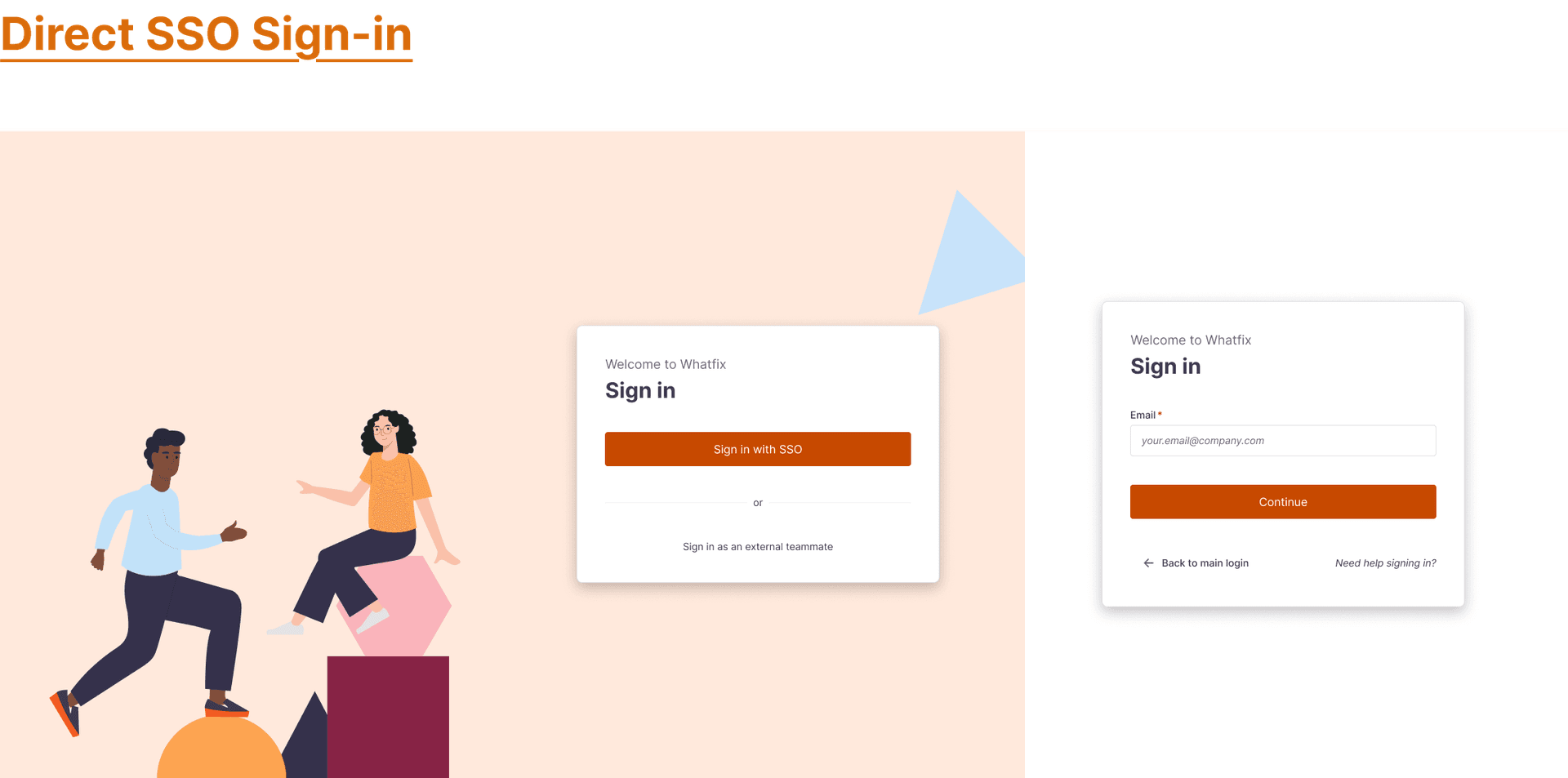
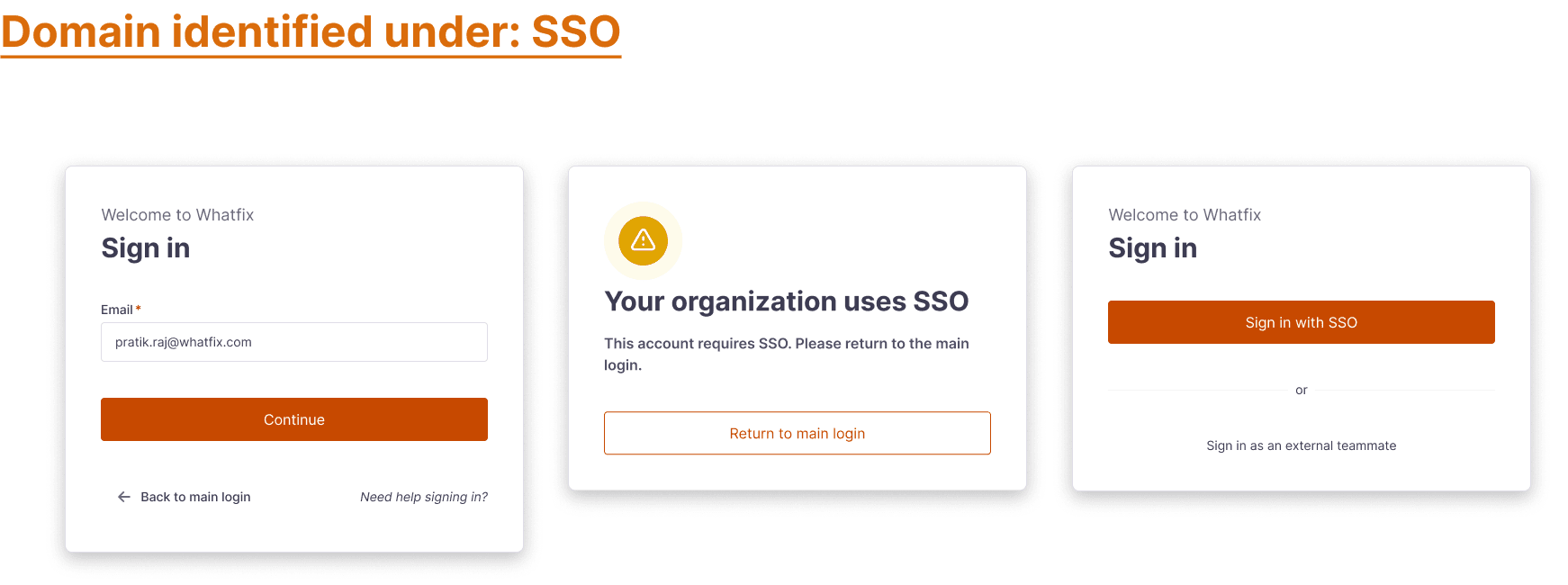
A · Single sign-on setup
The old SSO form asked admins to translate their identity provider into a series of inputs, then guess whether the translation was right. The new screen reads the metadata, parses the certificate, names the state, and only then asks for input.
The page looks calmer because it does more before it asks anything.
Behind the screens · Governance evolution
Two short comparisons of what shifted underneath the surfaces — not at the screen level — once identity was federated and provisioning was orchestrated.
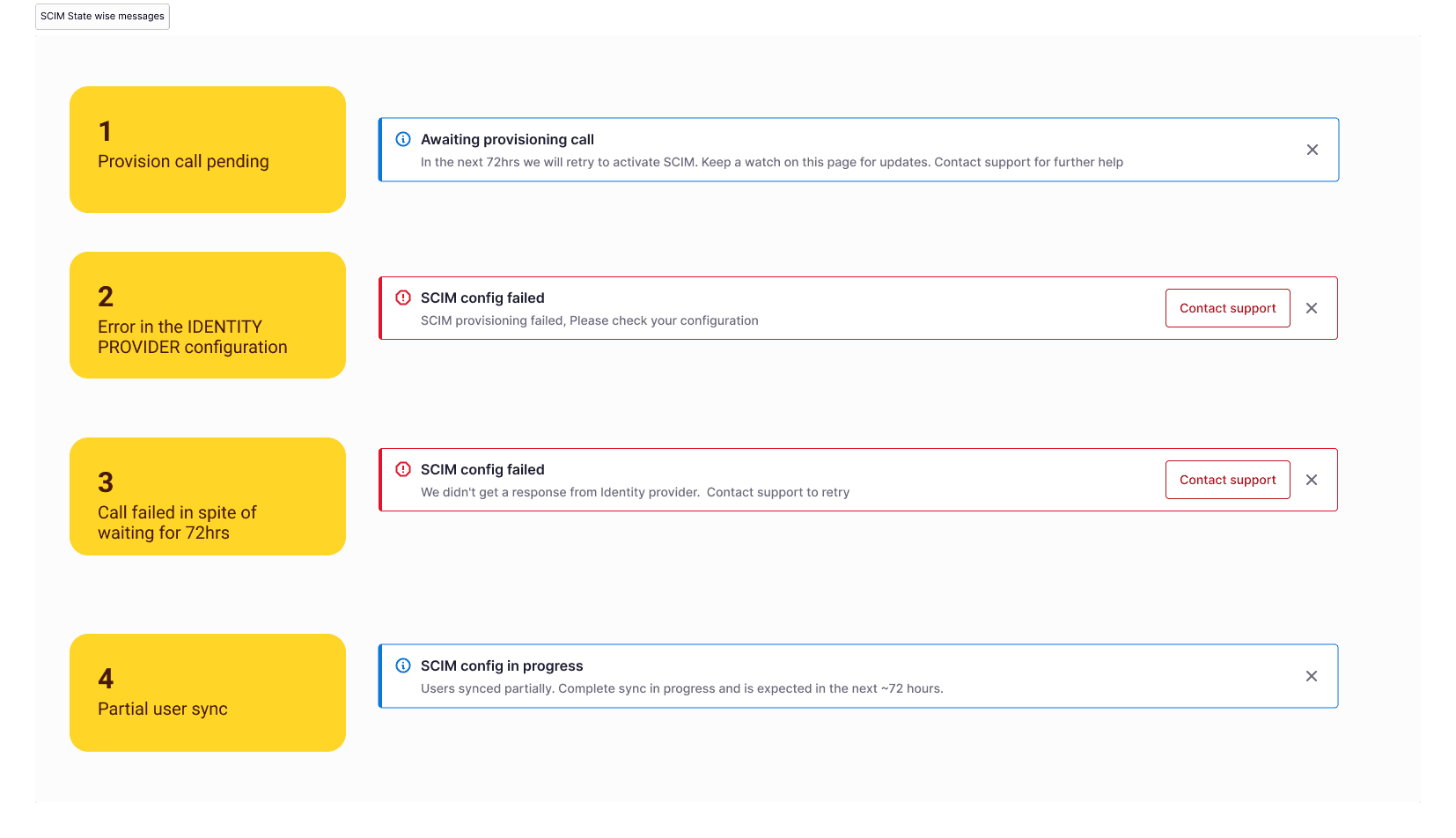
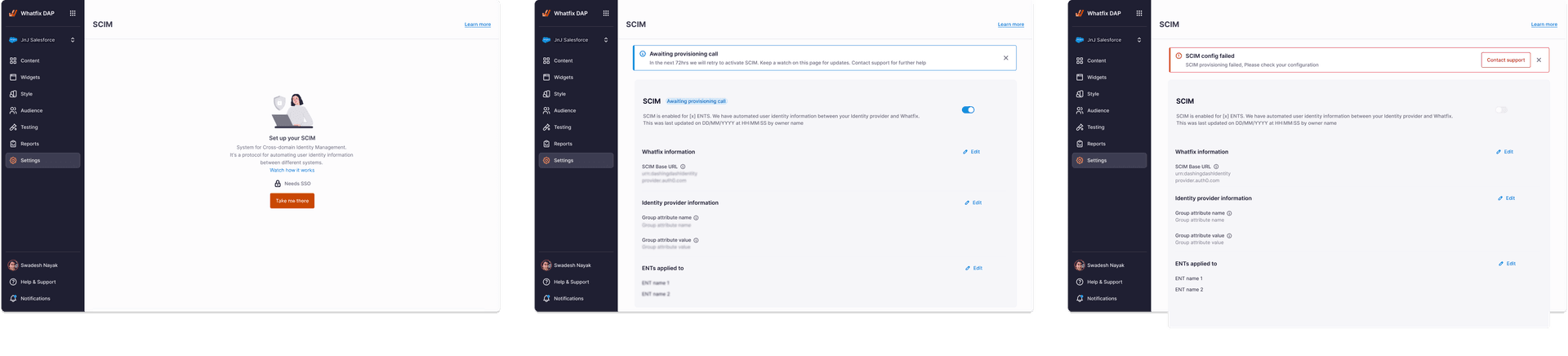
B · Provisioning as a living system
SCIM is rarely a single moment. It’s a token that has to be regenerated, a workspace list that grows, a role mapping that drifts, and a sync that can quietly fail at three in the morning. Some failures were temporary, some came from incorrect mappings, some from delayed syncs — and the surface had to read clearly for all of them.
One decision held the rest together: keep a single source of truth at a time. Manual paths close cleanly when SCIM is active, and reopen — just as cleanly — when it isn’t.
Behind the screens · Operational workflows
Three workflow walkthroughs — provisioning, SSO with fallback, and teammate lifecycle — kept off the main page so the case study stays focused on the story.
Flow B · Identity, end to end
Identity provider
IdP as the source of truth
SSO setup
Metadata read, state named
SCIM provisioning
Tokens, sync, edge states
Role mapping
Explicit precedence per rule
Operational lifecycle
Drift, audit, recovery
04 · Resilience & Lifecycle
What happens when an admin can’t get in? What happens to a teammate slowly, over years? Once identity was federated, the design problem moved — from how people get in to what happens around them once they’re there.
A · Fallback access
The first constraint was simple: the platform has to stay administrable when the identity provider isn’t. That meant a fallback path that’s discoverable but not visible — and a small class of user that survives a sync gone wrong.
Every fallback sign-in notifies the other admins. Resilience without visibility is just risk in a different jacket.
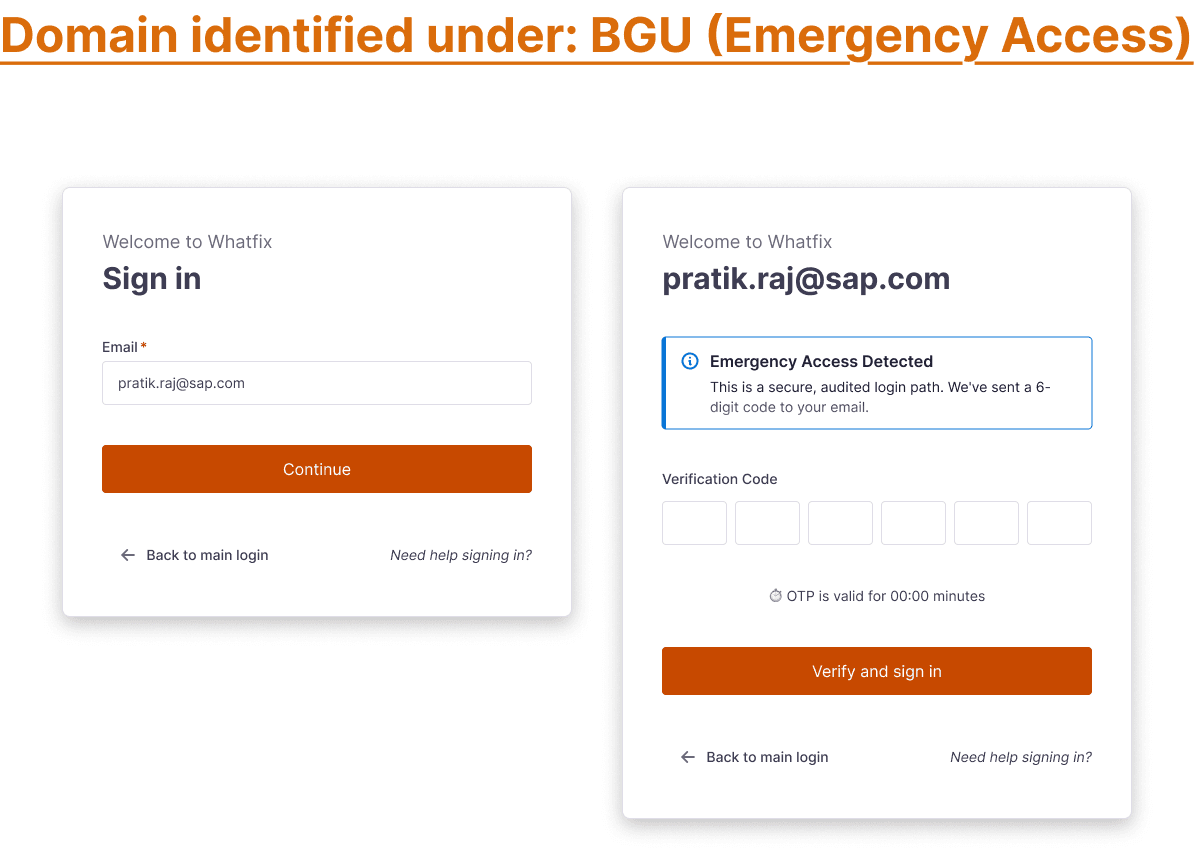
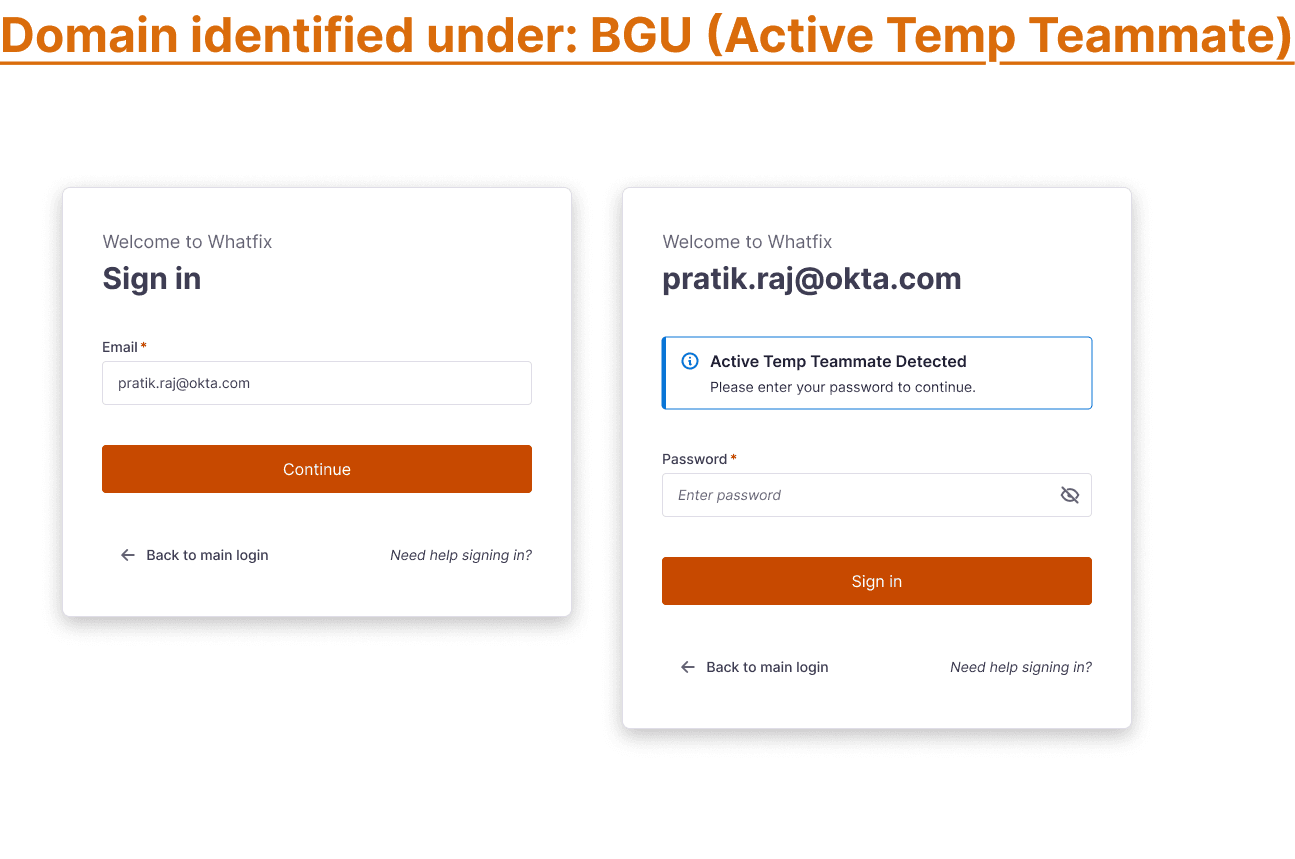
Two narrow paths the system can take when the identity provider isn’t reachable — an emergency fallback for outages and a separate one for temporary access already in flight.
B · Teammate lifecycle
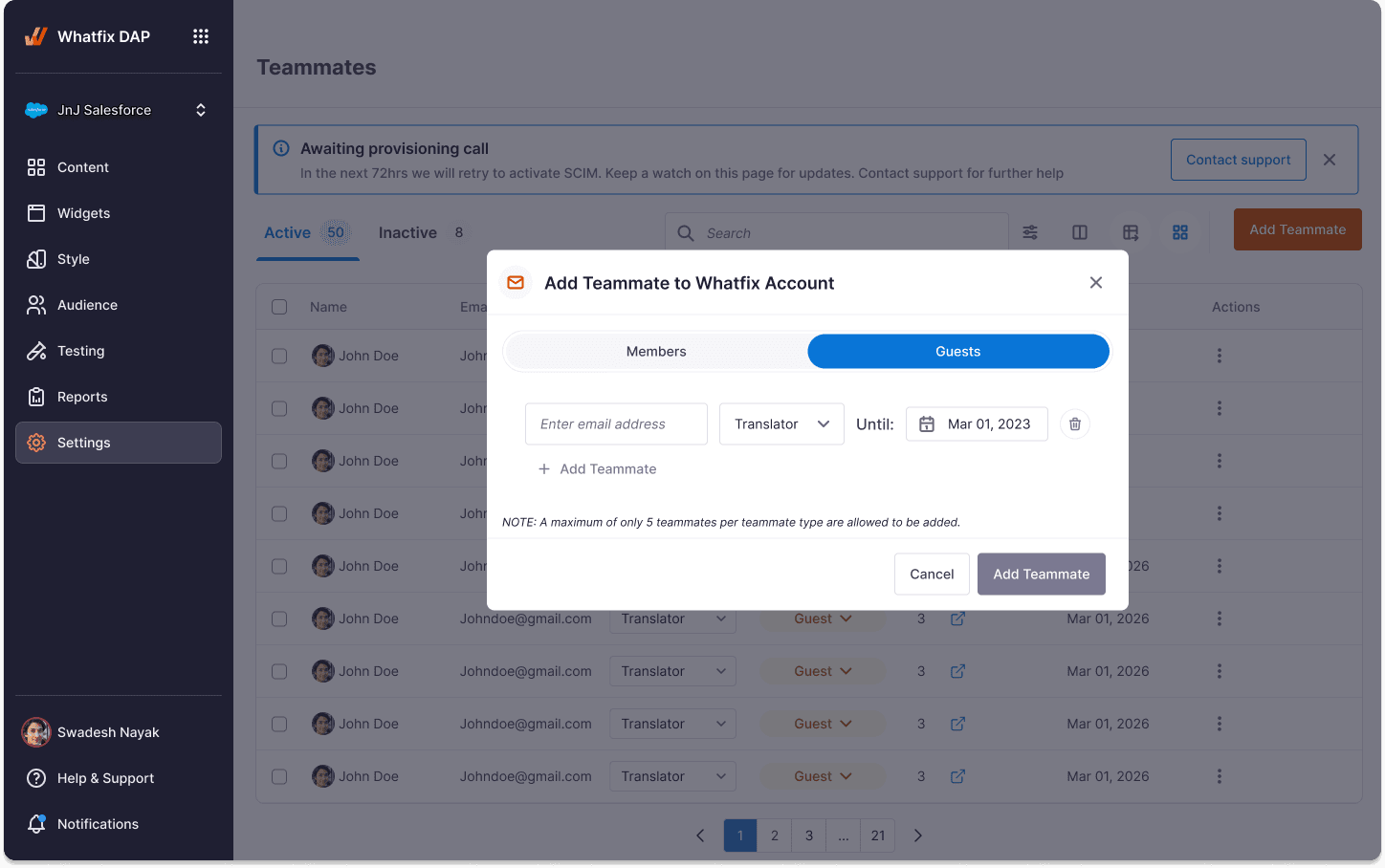
The teammates page had quietly grown into the most-used screen in the admin area. The redesign treats every member as a lifecycle — managed, unmanaged, guest, or temporary — so the same actions read consistently across all four states.
When SCIM is on, certain rows become read-only. The source of truth is named at the row itself, not hidden behind a global toggle.
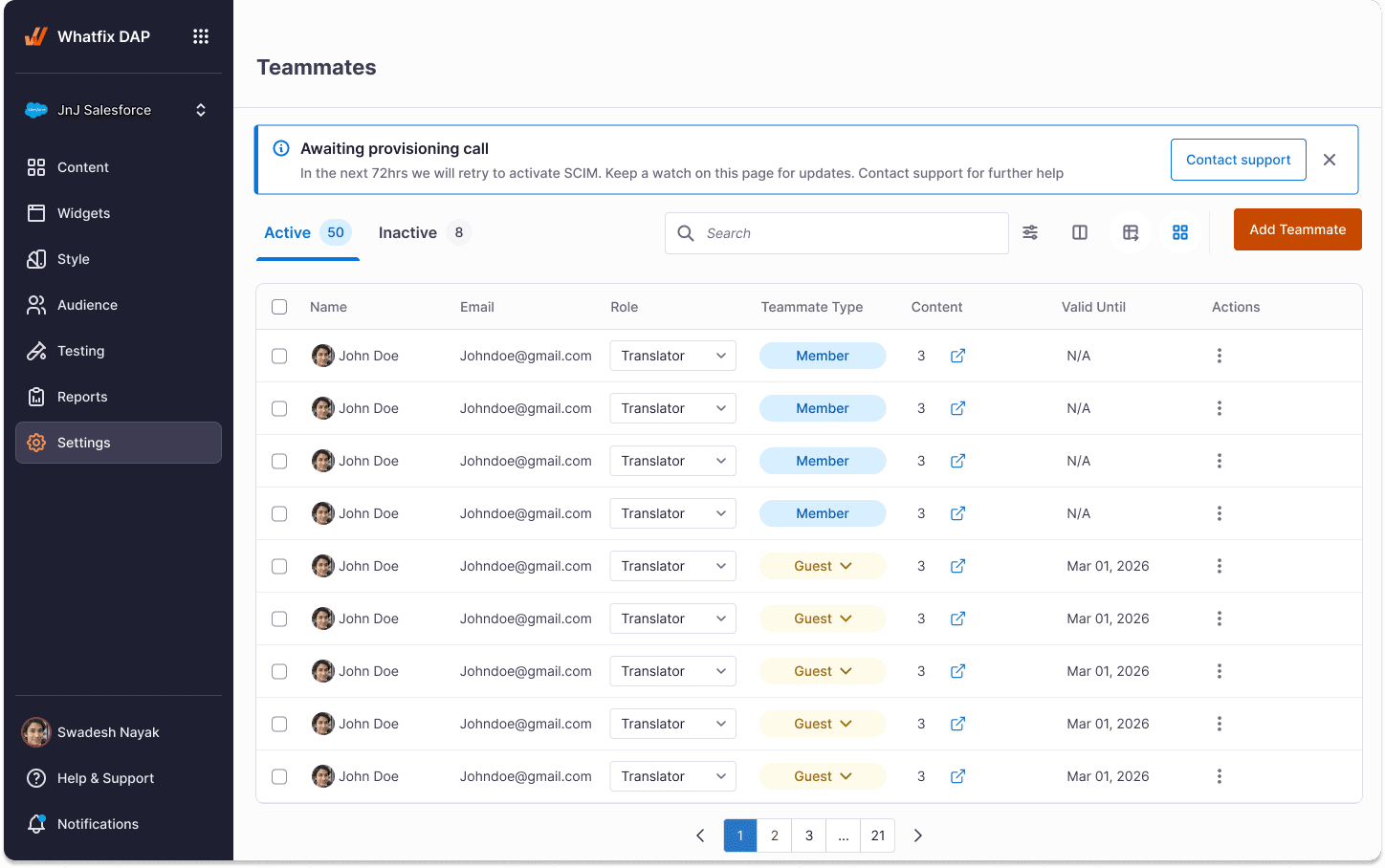
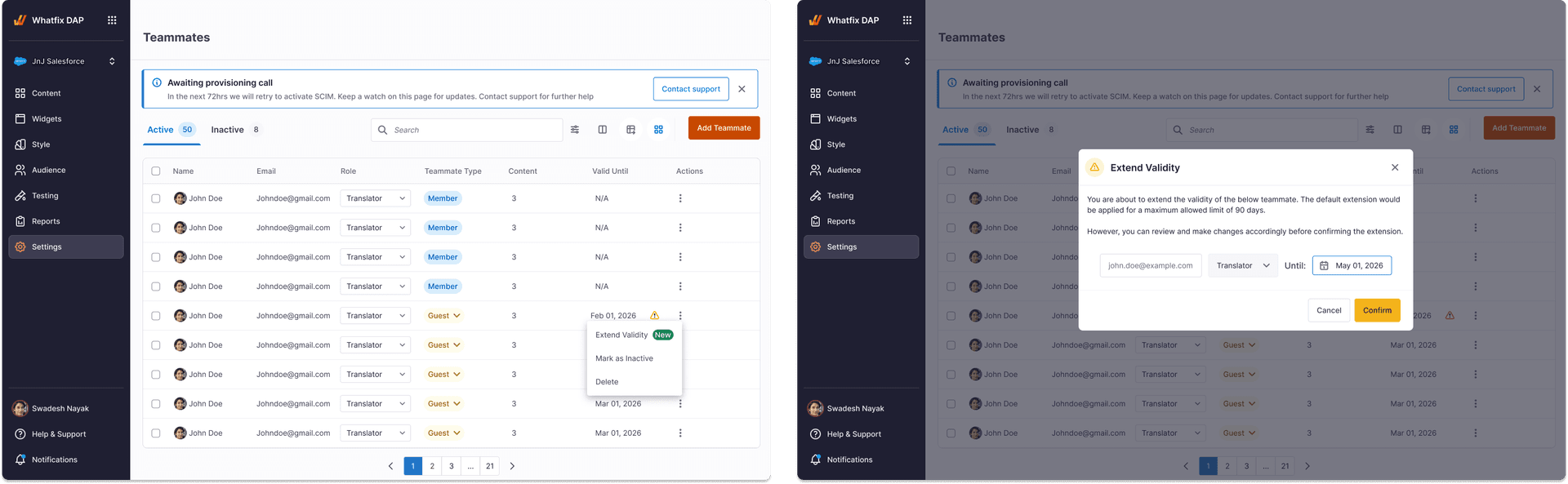
Flow C · How resilience is paid for
SSO unavailable
IdP outage, cert expiry, misconfig
Break-glass access
Discoverable fallback, sync-exempt
Temporary continuity
Time-bounded, audit-notified
Lifecycle recovery
Return to IdP, close the door
Behind the screens · Design explorations
Wireframe-level direction studies — kept on the page so the call the team made reads as a call, not as the only possibility.
05 · The admin home
Each redesigned surface had quietly been built to feed the same model — workspaces, identities, roles, lifecycle. With those shared underneath, the dashboard wasn’t a new feature so much as a long-overdue consequence.
The Monday-morning view
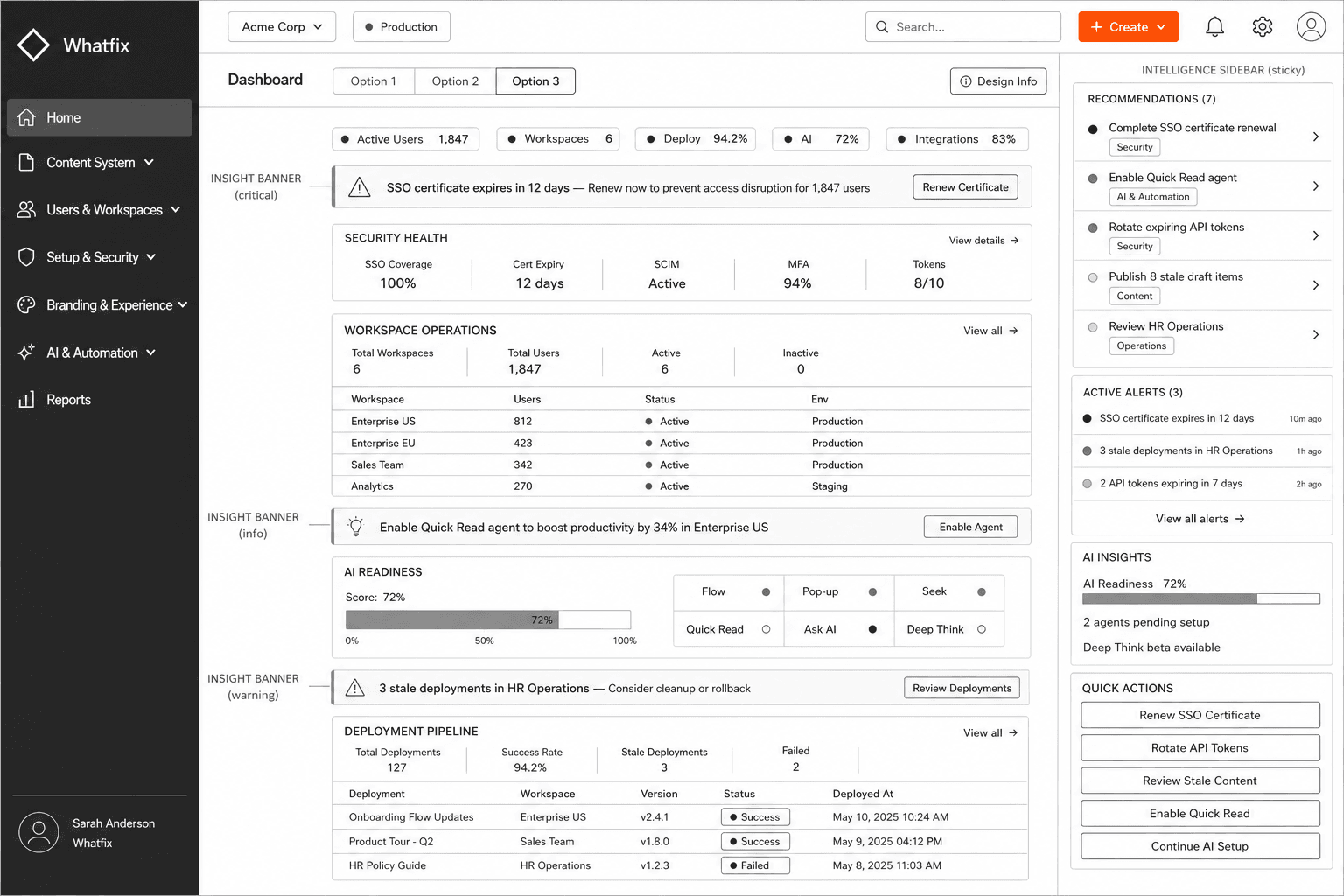
The admin home is the screen someone should be able to keep open all day and trust. It shows the workspaces under their care, the identity posture of each, anything that needs attention, and one clear next action.
Deliberately not an analytics page. An operational page that happens to summarise.
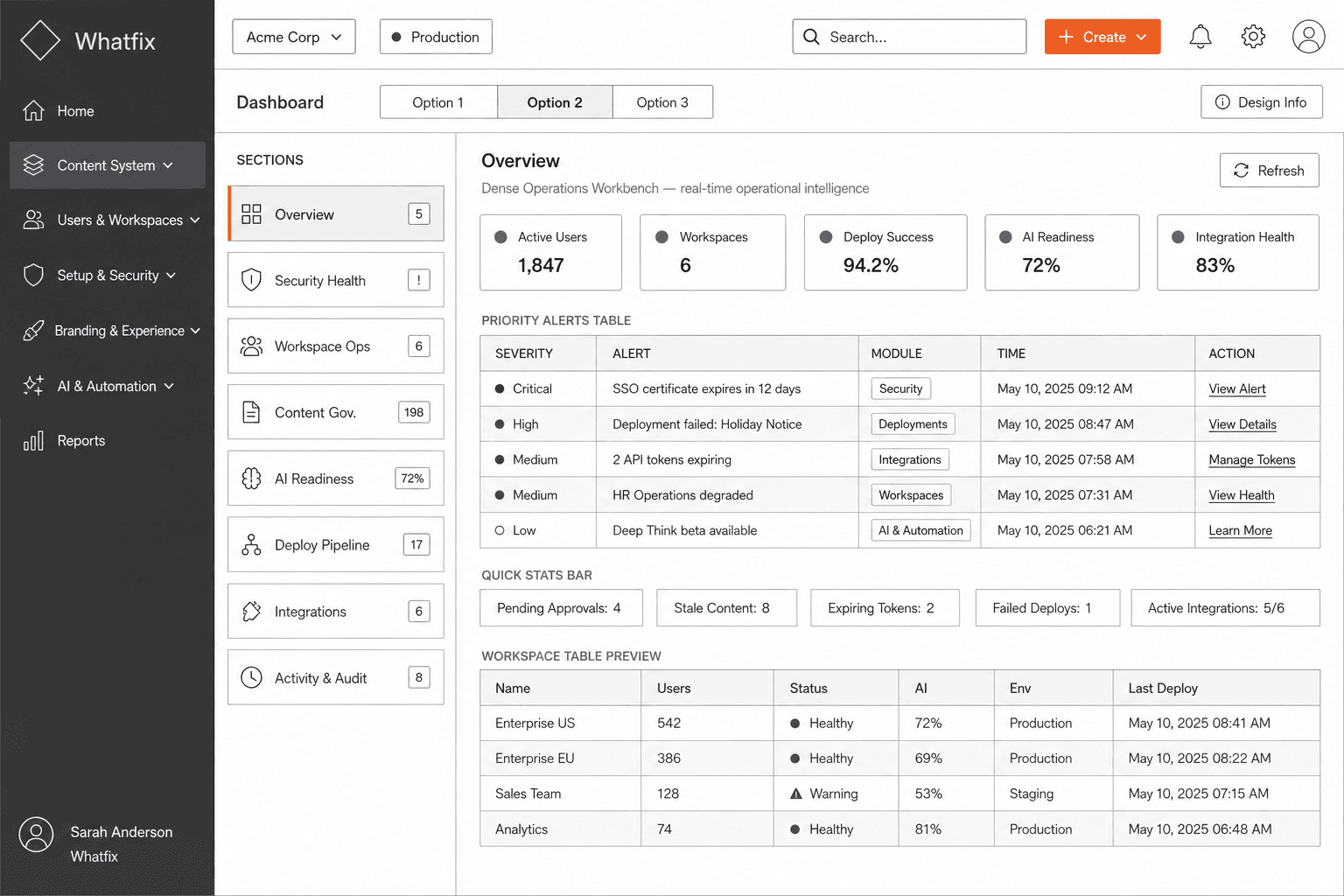
For comparison · An alternate direction
Flow D · What the surface brings together
Workspaces
The unit of governance
Identity
SSO posture, cert state
Teammates
Roles, ownership, lifecycle
Auditability
What changed, when, by whom
Operational visibility
One view, ready on Monday
“The dashboard isn’t a new product. It’s what the existing products look like when they finally know about each other.”
06 · Reflection
The most useful outcomes weren’t the screens. They were the shifts underneath — in how the team described governance, what we considered a design surface, and what we were willing to leave alone.
What follows isn’t a metrics page. Numbers in this space are usually proxies for comfort. The honest signal is whether enterprise customers stopped having to ask the same questions every quarter — and increasingly, they did.
In closing
Enterprise governance design rarely rewards velocity. It rewards patience — the willingness to wait for a coherent system to be possible before drawing the screen that depends on it. The work I’m proudest of in this project isn’t any single surface; it’s that, by the end, the surfaces had started behaving like a platform.
— Pratik Raj