IdP directory
Users, groups, attributes — owned by the enterprise's identity team.
Governance Platform · Design deep dives
A collection of detailed walkthroughs covering identity setup, provisioning behavior, fallback access, and teammate lifecycle management across enterprise environments.
These sections expand on the main case study with deeper workflow thinking, edge cases, and operational decisions that shaped the final platform experience.
Workflow · Provisioning
Identity is owned by the customer's identity provider. The platform's job is to listen to it accurately, apply the result deterministically across every workspace, and keep that loop legible to the admin — through token rotation, role mapping, and sync failures.
01 · Source
Identity provider· Source of truth
IdP directory
Users, groups, attributes — owned by the enterprise's identity team.
Group membership
Reflects organisational structure; downstream role mapping reads from here.
Identity audit
Joiner / mover / leaver events originate at the IdP; the platform observes.
SCIM 2.0
Token-authenticated, push-mode
02 · Orchestration
SCIM module· Platform-managed
Token issuance
Bearer tokens scoped per tenant. Rotation is visible — never hidden behind a regenerate button alone.
Tenant-scoped
Sync engine
Reconciles incoming SCIM operations against tenant state; back-pressure on bursts.
Idempotent · ordered
Role mapping rules
IdP groups → platform roles, with explicit precedence so two rules never silently disagree.
Retry & reconcile
Failed operations queue with a bounded retry window; reconciliation runs on a quiet schedule.
Bounded retries
Lifecycle states
Managed · Unmanaged · Guest · Temporary. Each row knows which one applies.
Audit trail
Every reconcile, mapping change, and token event becomes a row in the audit log.
Outbound sync
Tenant-scoped, observable
03 · Tenants
Workspaces· Enterprise destinations
Workspace · A
Region: NA · SCIM on
Workspace · B
Region: EU · SCIM on
Workspace · C
Region: APAC · SCIM on
+ N tenants
Each workspace inherits the orchestration contract above.
The platform doesn't own identity. It listens to identity that lives somewhere else — and the design has to make that asymmetry obvious at every step, not just on the day setup happens.
Screens · Provisioning
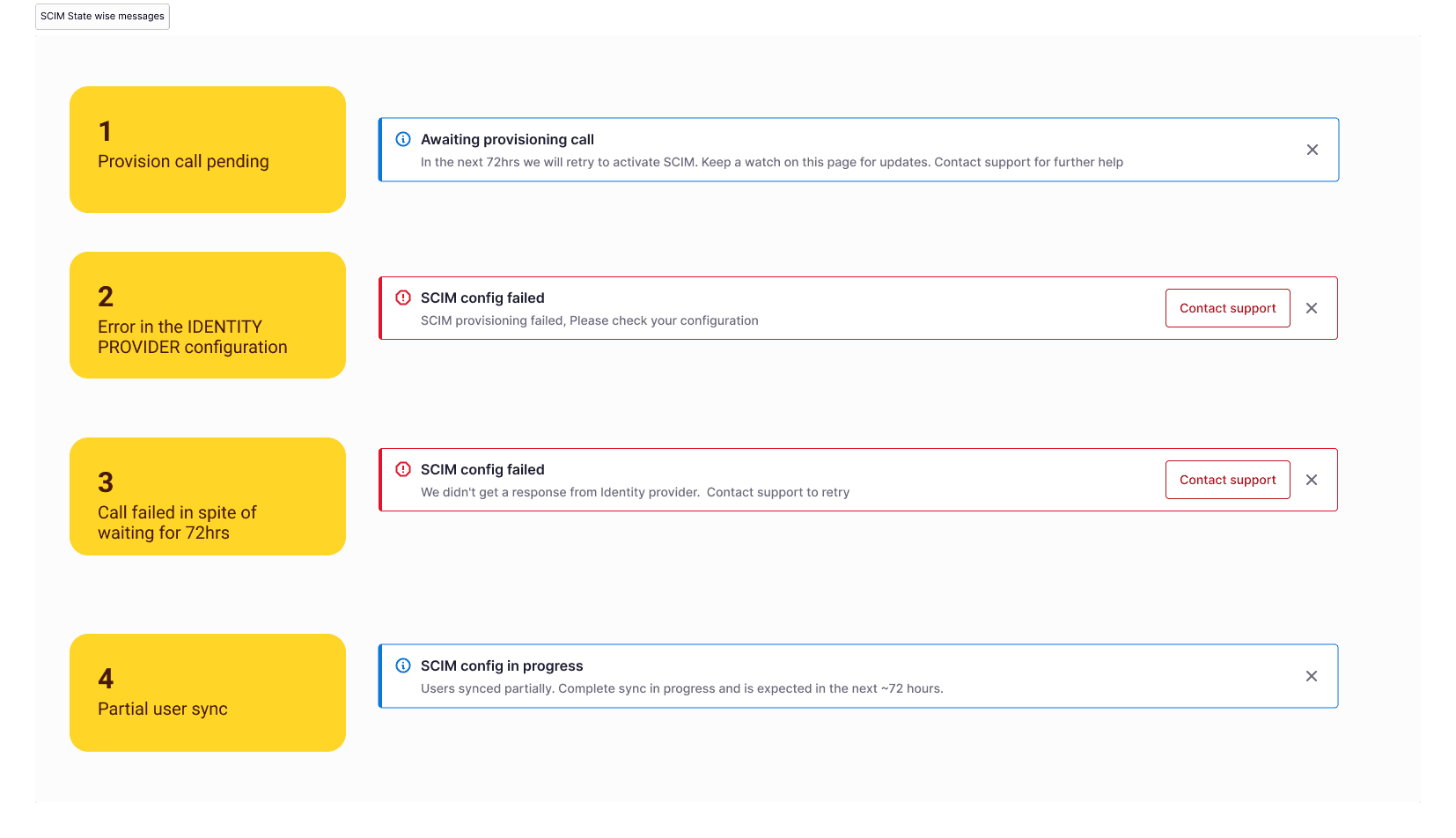
The role-mapping surface, the conflict-prevention model behind it, and the state-aware messaging that turns setup into an ongoing system the admin can trust.
The centrepiece of SCIM administration: IdP groups mapped to platform roles, with precedence held explicit so two rules can never silently disagree.
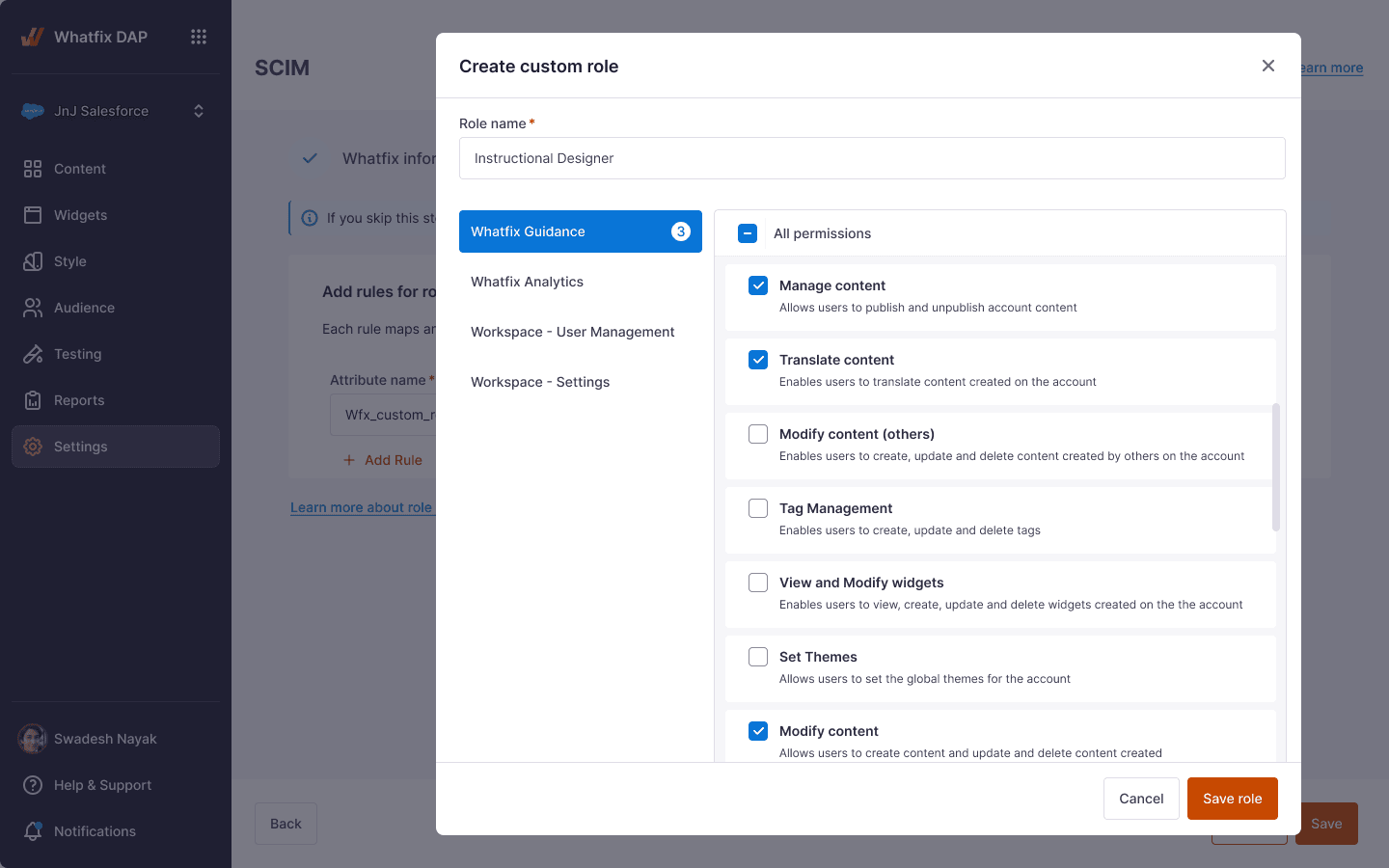
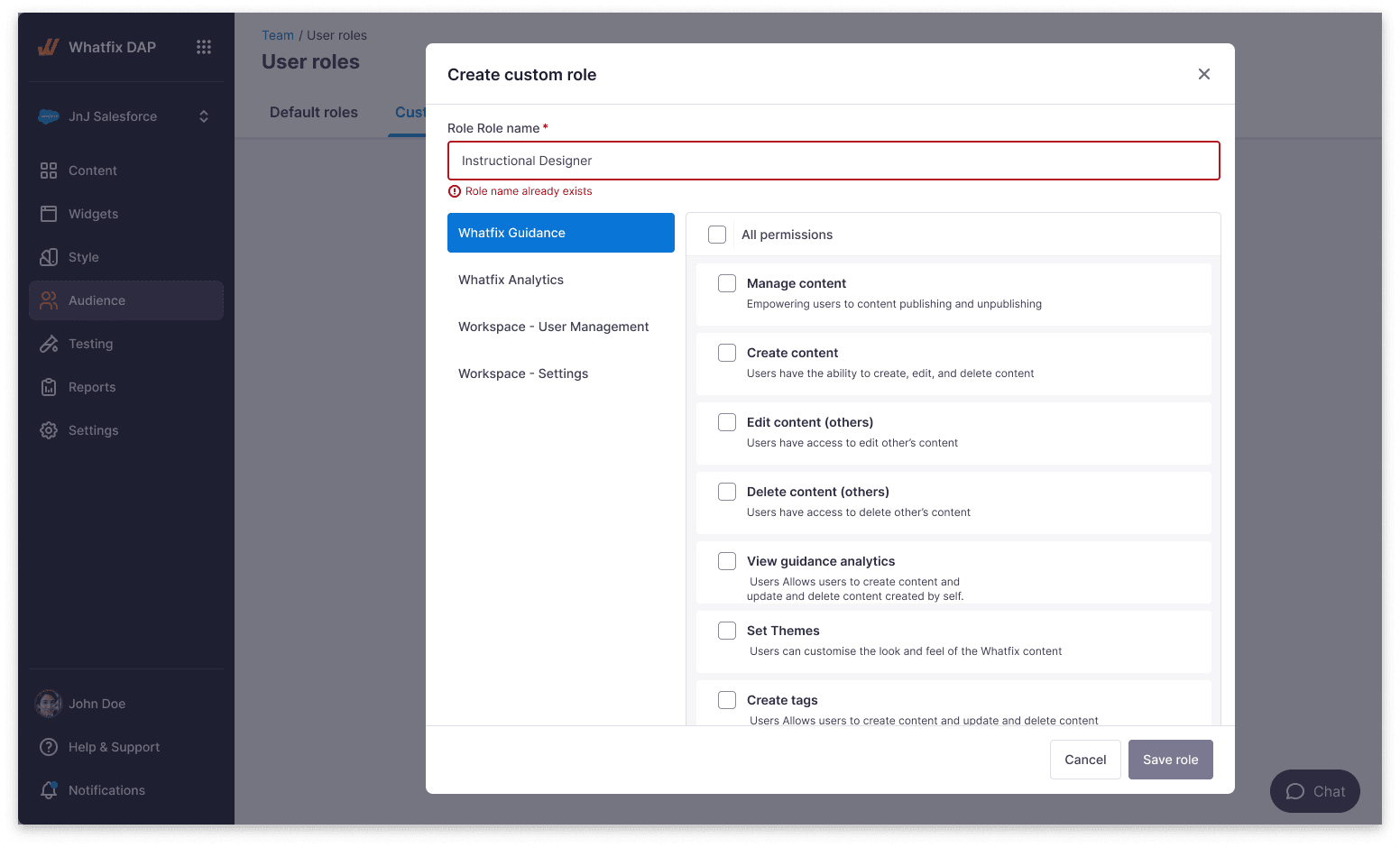
Two adjacent surfaces that keep role mapping coherent as the enterprise grows — explicit conflict prevention and a small set of well-named role abstractions.

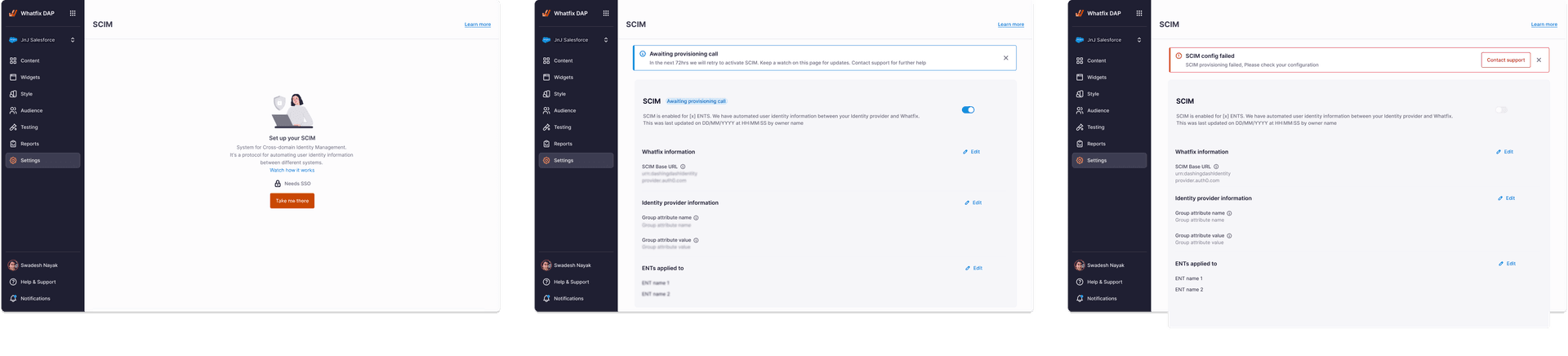
Setup completion isn't the same as system health. These two surfaces turn the SCIM configuration page into a page that also reports on itself.
Workflow · SSO and fallback access
Most days, single sign-on works. On the day it doesn't — a certificate expires, an IdP outage hits, a misconfiguration lands — the admin still needs to get into the platform. This workflow shows the primary sign-in path, the two narrow fallback paths beside it, and the recovery loop that returns the system to SSO as soon as it can.
00 · Entry
Admin sign-in· Single surface
Admin opens admin URL
No fork in the URL itself — the same address handles both paths.
Tenant lookup
Tenant resolved from the email domain or workspace hint.
Auth router
Reads tenant SSO posture; decides which path to surface next.
State-driven
Authentication state
IdP available
IdP unavailable
01a · Primary
SSO· Happy path
Metadata exchange
IdP metadata parsed; entity ID, ACS URL, and certificate read inline.
SAML / OIDC handshake
Assertion validated against the configured signing certificate.
Certificate state
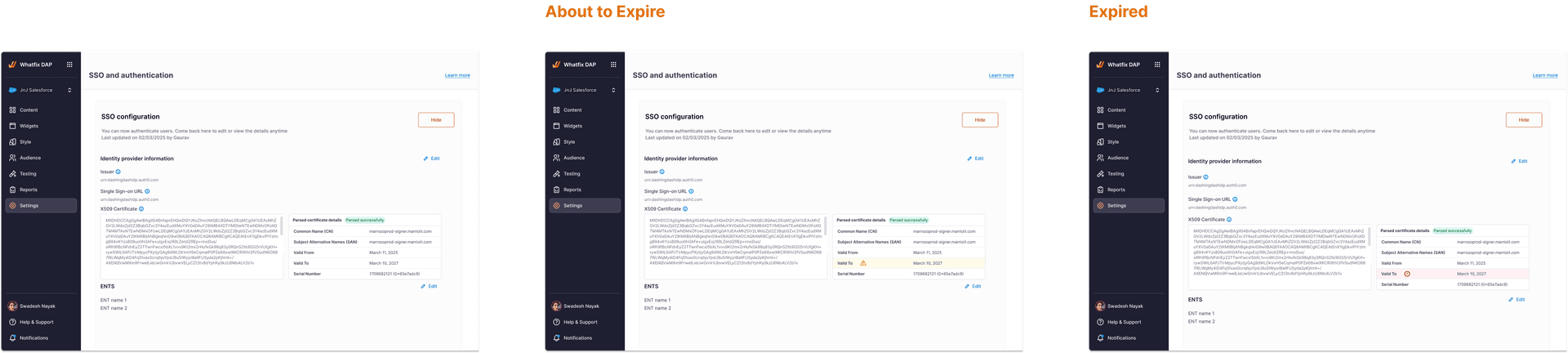
Healthy · Near-expiry · Expired — surfaced before the admin is locked out.
Pre-emptive
Session issued
Standard session, scoped to tenant, observed in the audit log.
01b · Fallback
Break-glass user· Always discoverable
BGU credential
Local credential held by a small set of named admins; never federated.
Sync-exempt flag
The BGU account is immutable by SCIM. A failed sync can't disable the door.
Immutable property
Hard ceiling
A tenant cannot have more than N break-glass users at a time.
Audit notification
Every BGU login pings the other admins — resilience without observability is just risk in a different jacket.
On every login
Recovery
Time-bounded continuity
02 · Recovery
Return to primary· Lifecycle-bounded
Temporary continuity
BGU session is time-bounded by policy; expiry is visible to the admin.
Time-bound
IdP health check
Platform polls the identity provider; restoration is observed automatically.
Return to SSO
When SSO is healthy, the next sign-in goes through the primary path again — the door closes itself.
Fallback access isn't a separate feature. It's the same authentication surface, with two narrow paths that stay available without being advertised — and an audit trail that makes sure no quiet entry is actually quiet.
Screens · SSO and fallback access
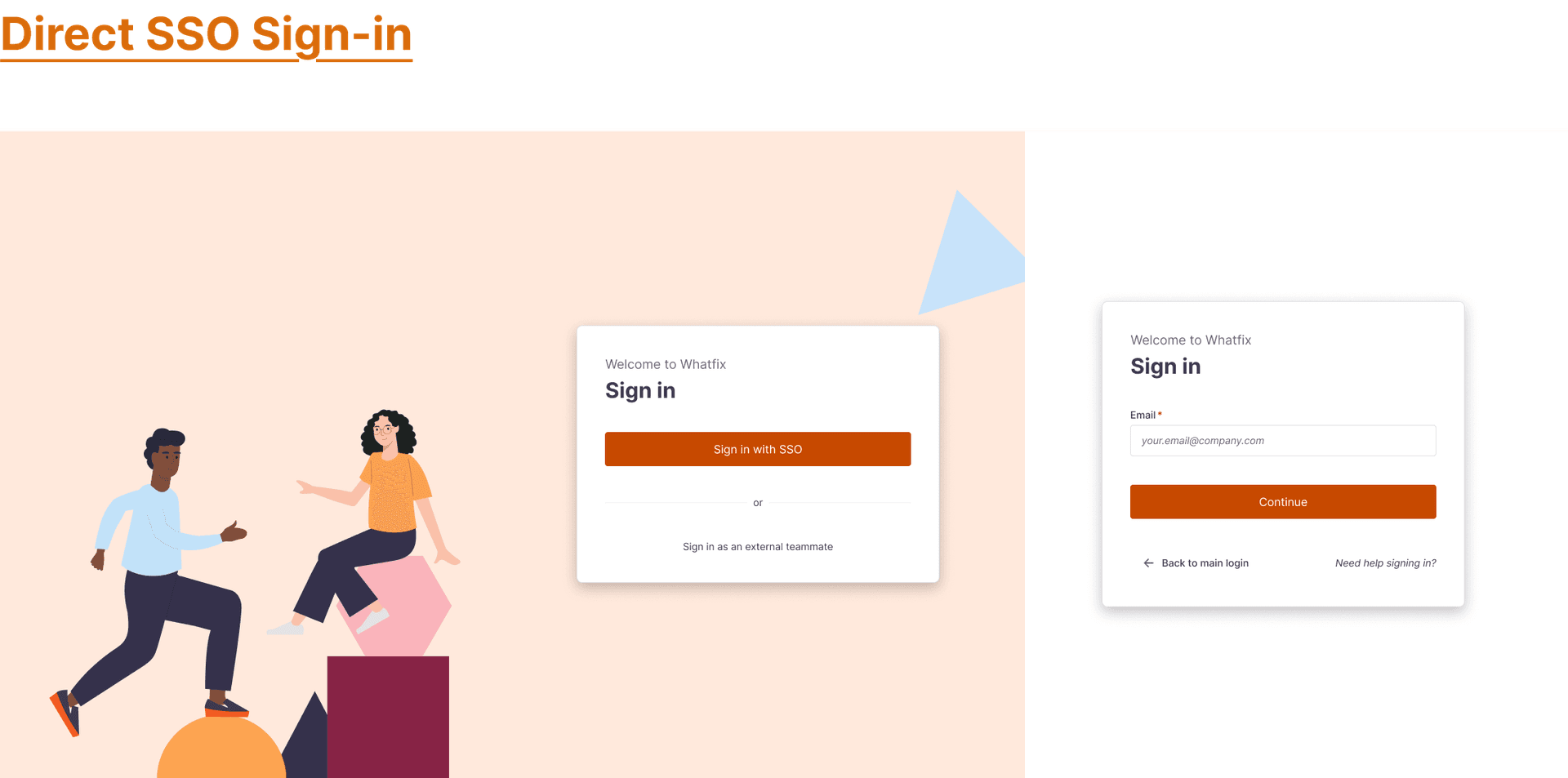
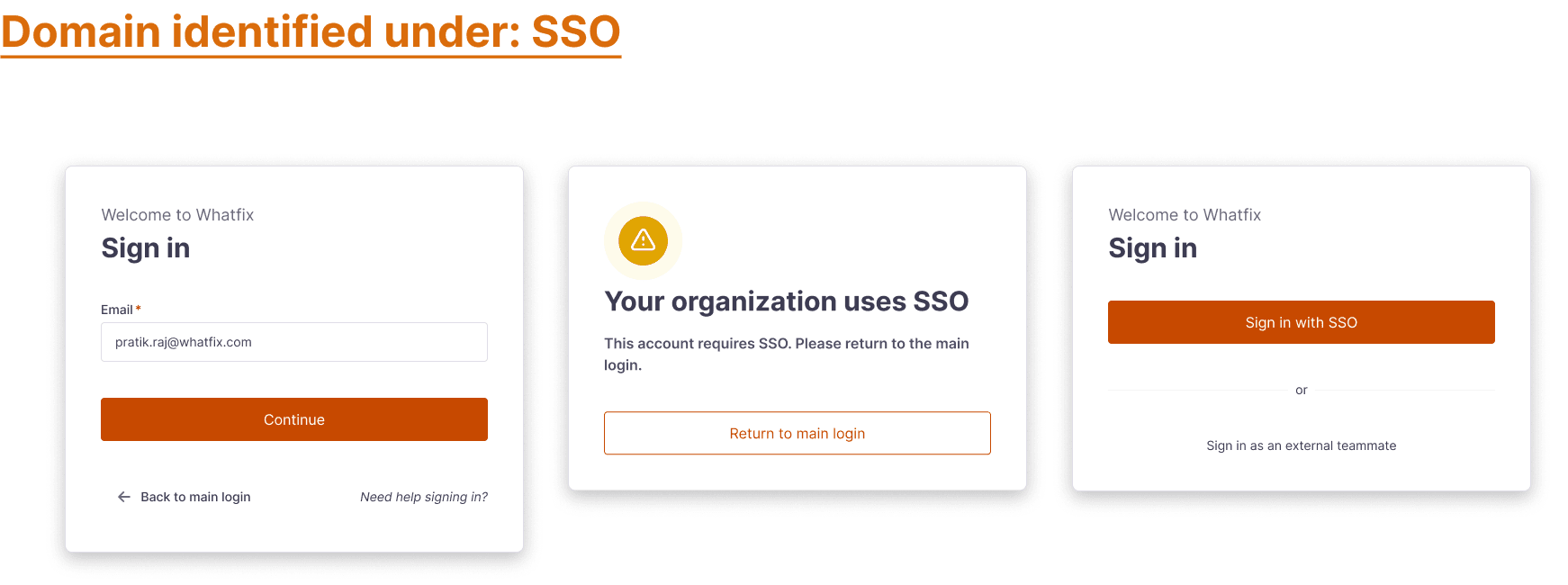
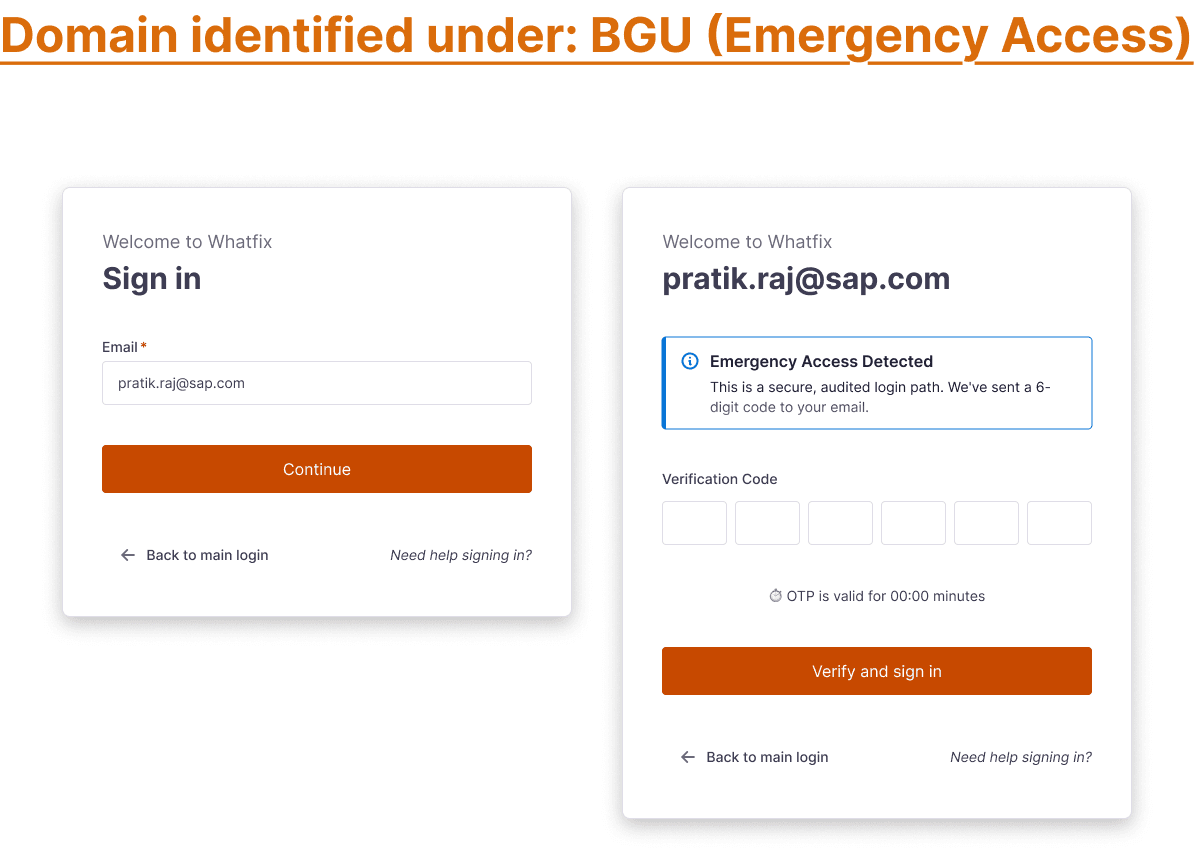
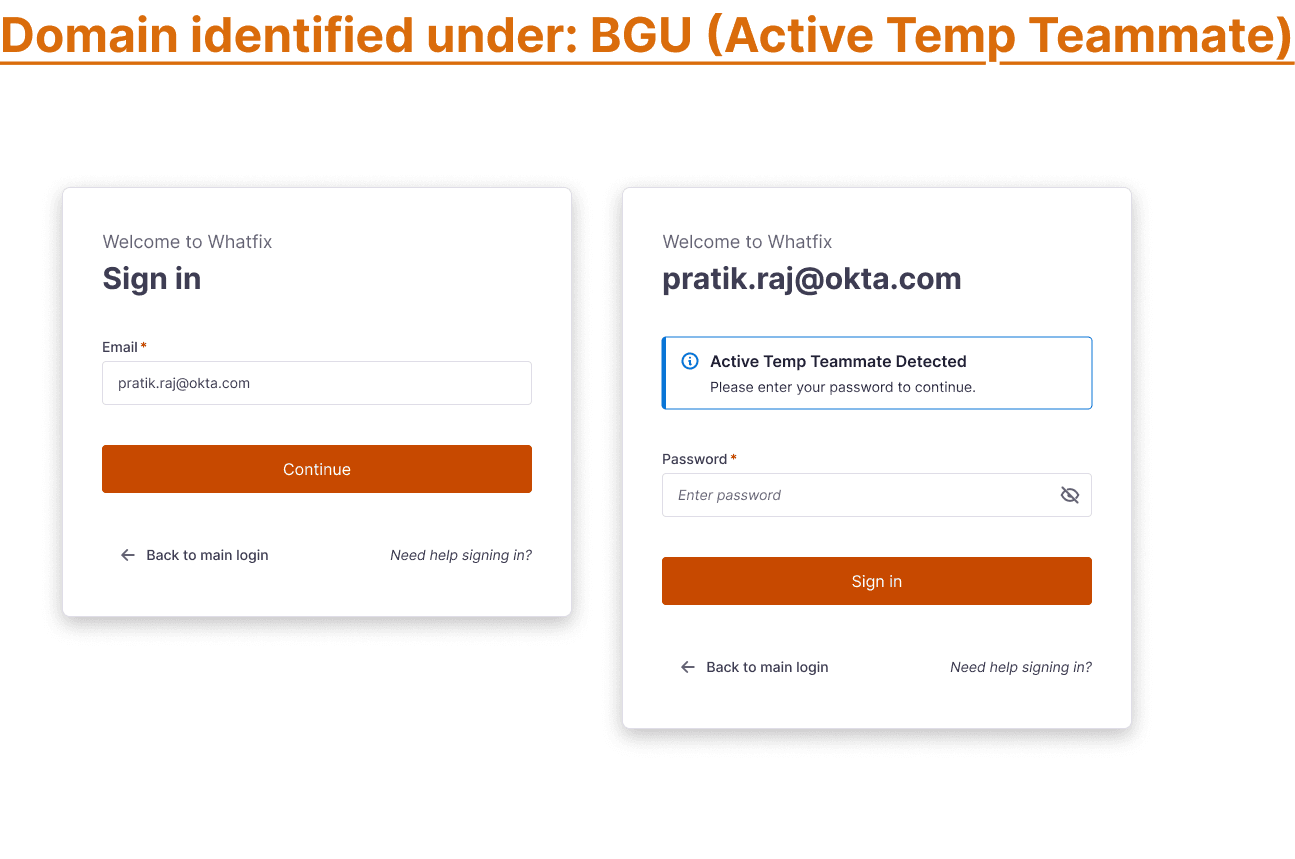
Six screens, in the order the system uses them — the canonical SSO sign-in, the domain identifier that routes the request, the two fallback paths, the metadata-aware setup surface, and the configuration summary the admin returns to.
The happy path. The default surface every admin sees first — the system assumes the identity provider is available.
The domain identifier — the small surface that decides whether the request continues on SSO or routes to a fallback path.
When SSO can't complete, the surface routes the request along one of two narrowly-scoped paths. Both stay available without being advertised.
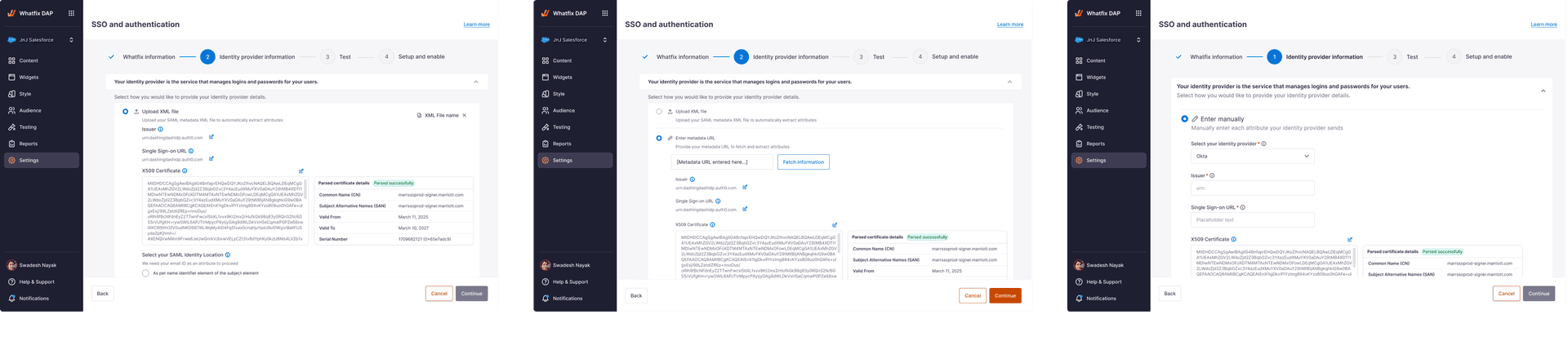
The setup page treats the IdP metadata as parseable input — not as a blob the admin has to translate. Errors are named, not generic.
The page the admin returns to after setup. The same surface that configured the integration now reports on its own state.
Workflow · Teammate lifecycle
Most of the operational risk in an enterprise account doesn't sit in the moment a teammate is invited — it sits in the years after. Six named states, the transitions between them, and three rules that stay true across all of them. The interface gets simpler because every row already knows what it is.
State · 01
Invited
Pending acceptance, scoped to a tenant.
State · 02
Active
Full member. Managed or unmanaged is decided by source of truth.
State · 03
Guest
External collaborator. Reduced surface, named owner inside the tenant.
State · 04
Temporary
Time-bounded session with an explicit expiry surfaced to the admin.
State · 05
Inactive
No recent sign-in. Visible in the operational table, not deleted.
State · 06
Archived
Retained for audit. Access removed; identity preserved for accountability.
Invited
Pending acceptance, scoped to a tenant.
Accepted
Active
Full member. Managed or unmanaged is decided by source of truth.
Guest
External collaborator. Reduced surface, named owner inside the tenant.
Temporary
Time-bounded session with an explicit expiry surfaced to the admin.
Inactive
No recent sign-in. Visible in the operational table, not deleted.
Off-boarded
Expiry
Off-boarded
Archived
Retained for audit. Access removed; identity preserved for accountability.
Lateral · Ownership transfer
Reassigns a teammate’s assets without changing their identity. Transition lives outside the states.
Lifecycle is the part of governance admins live with longest, and that gets the least design attention. Naming the states explicitly meant the interface could finally answer the questions the configuration page never asked.
Screens · Teammate lifecycle
The states named in the workflow are operated through four surfaces — the teammates view, validity handling for time-bounded access, distinct member and guest invite paths, and the domain-policy constraints that gate invitation.
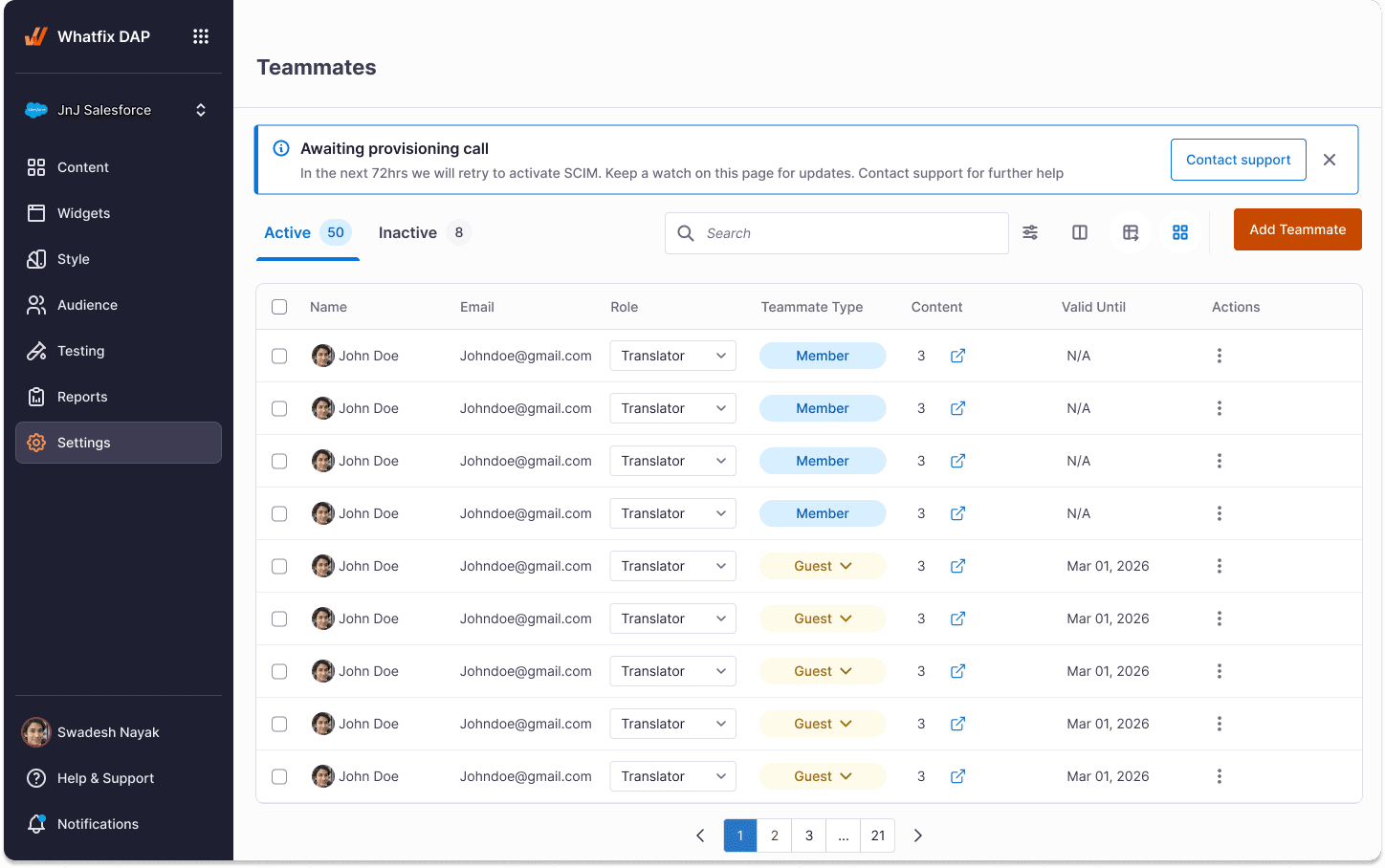
The lifecycle, surfaced. Every row carries the state it is in — managed, guest, temporary, inactive — and the action menu adapts to the row, not the page.
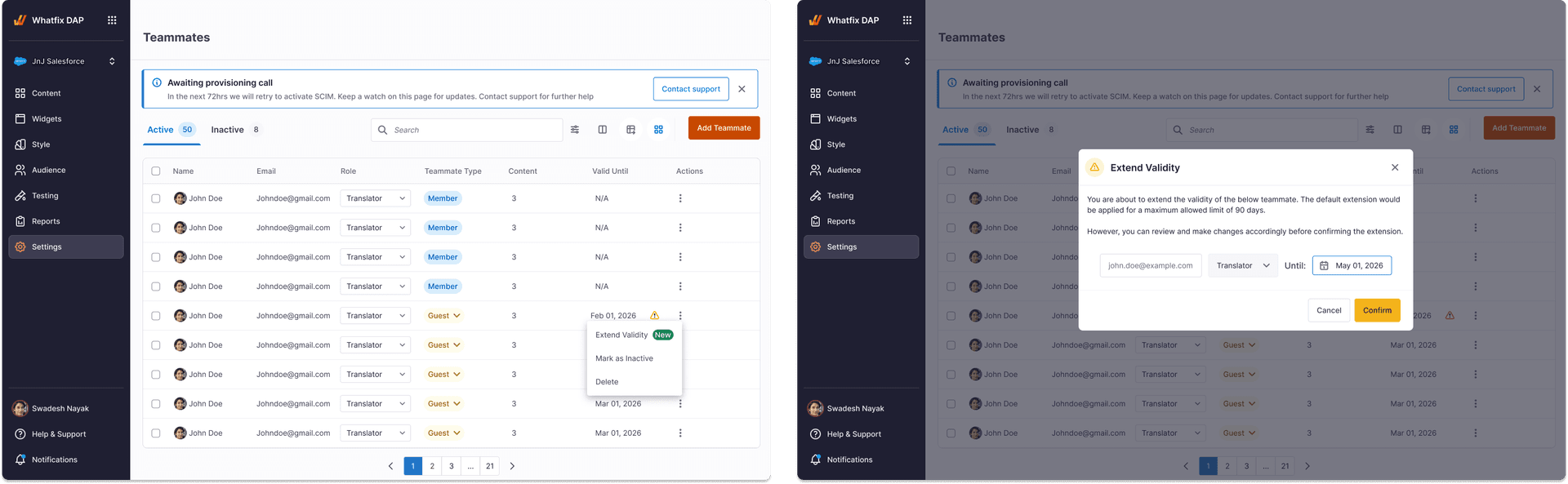
Temporary access modelled as a property of the row, not a separate page. Expiry is visible, editable, and reads as part of the lifecycle — not as an afterthought.
Members and guests enter the lifecycle through deliberately separate surfaces — same component shell, different defaults, different governance rules.
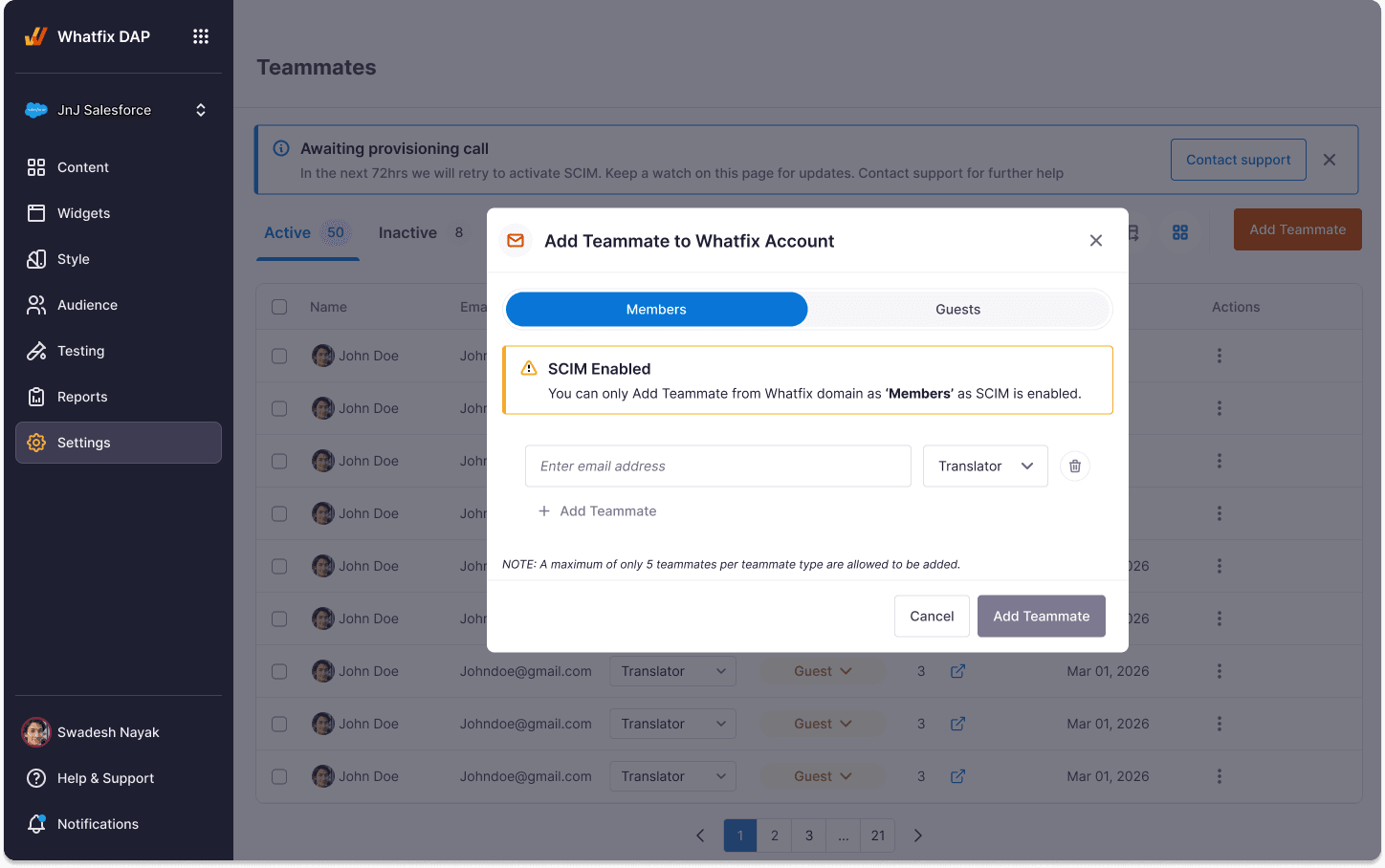
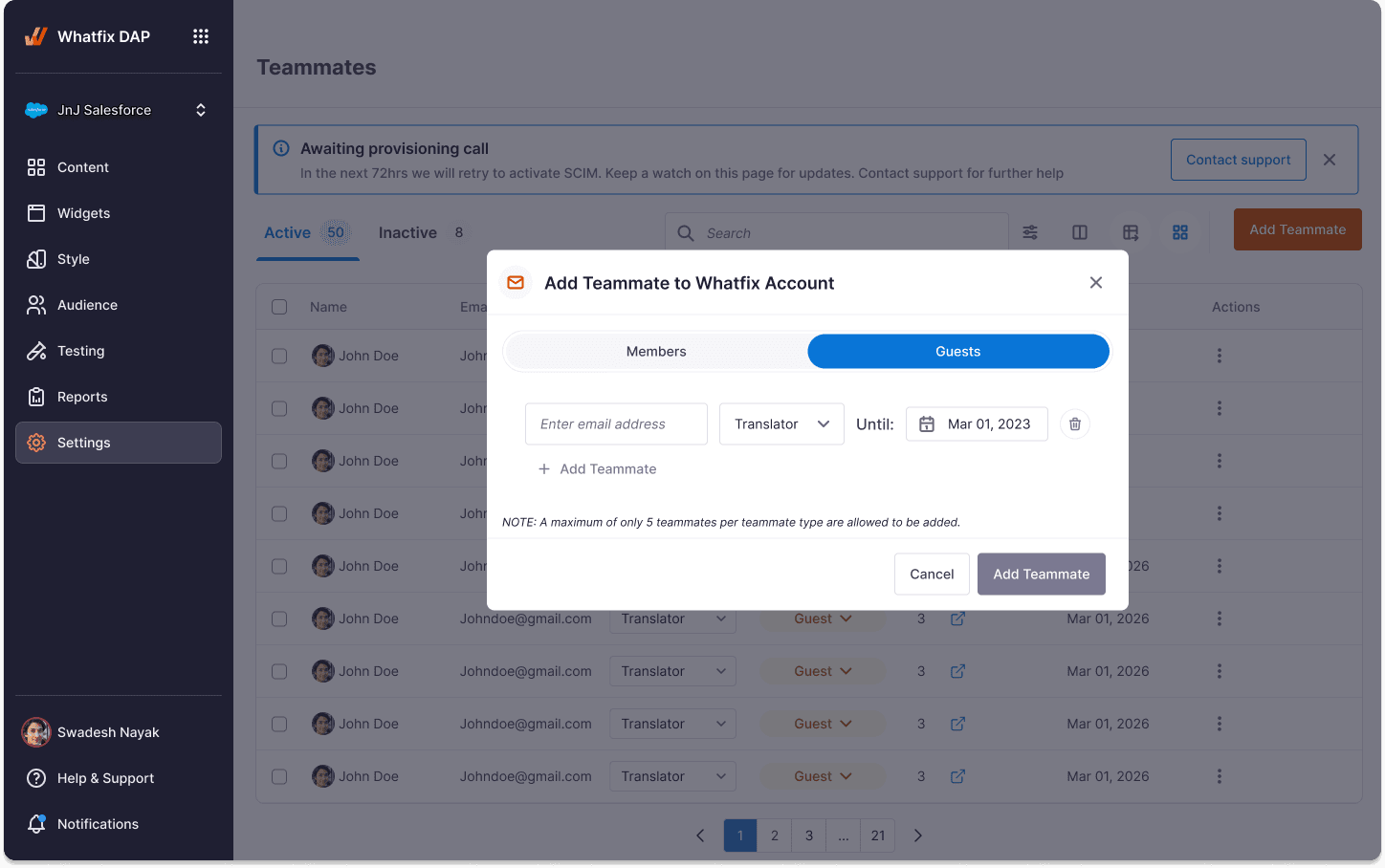
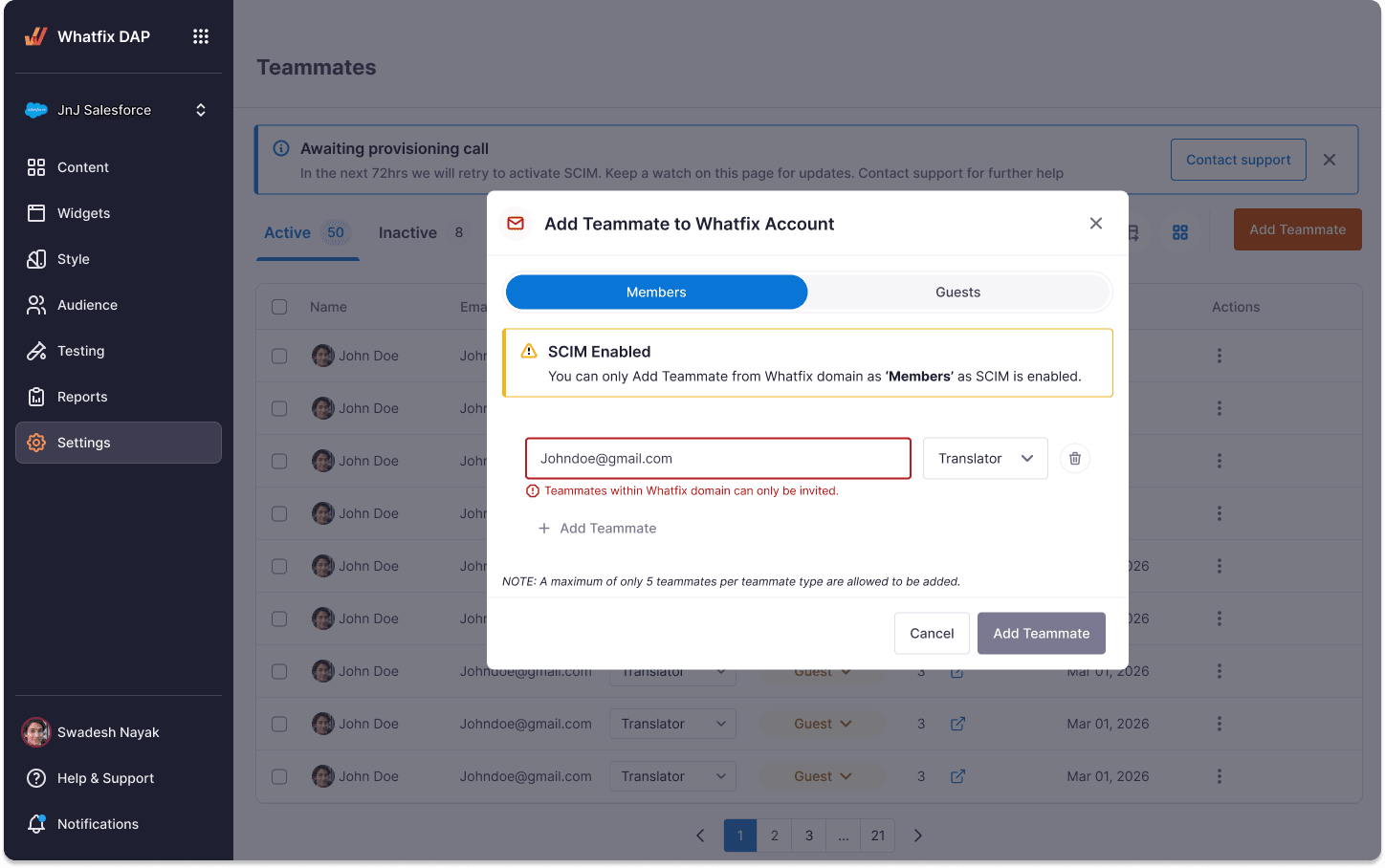
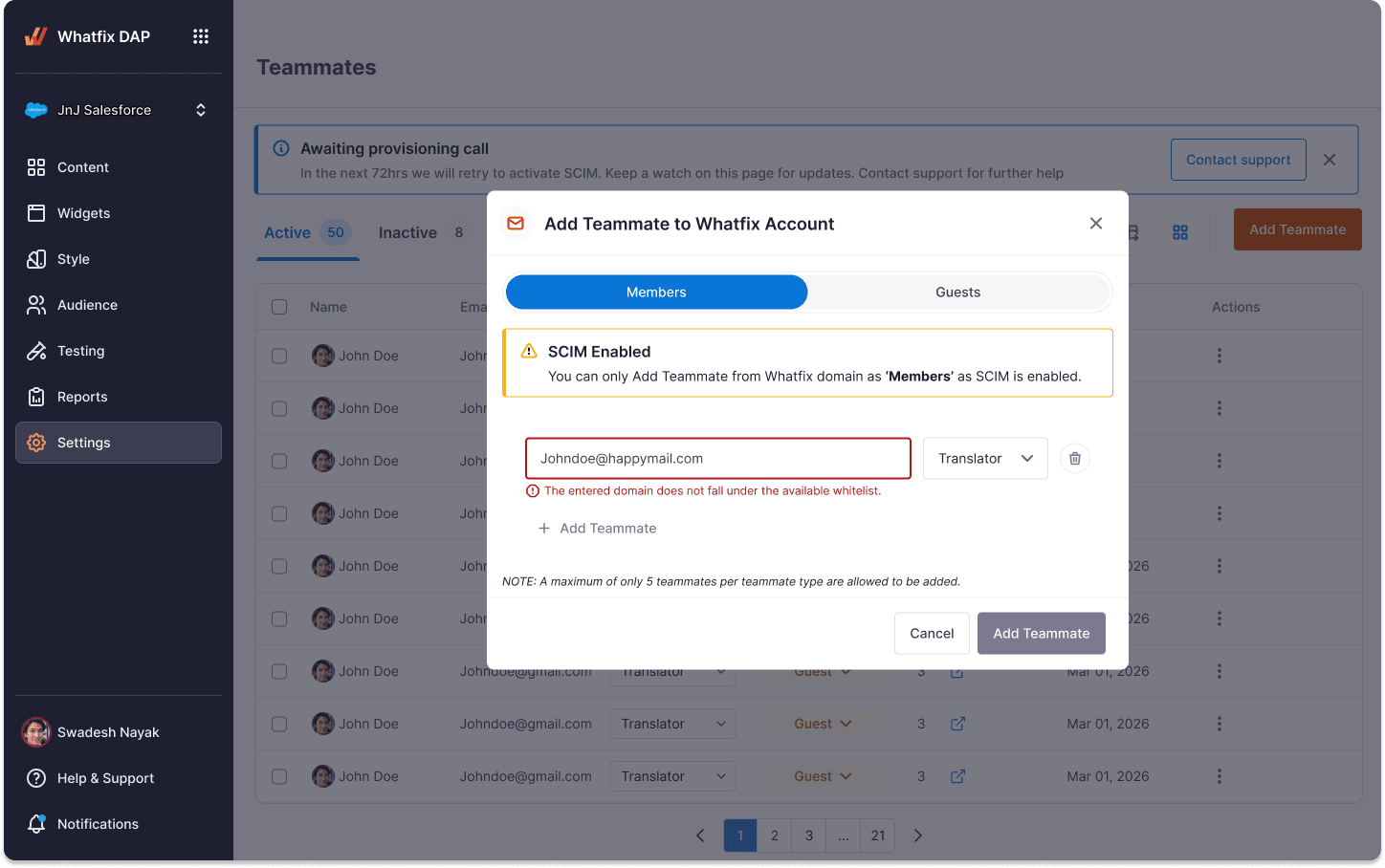
Domain policy enforced on the invite surface, named explicitly. The error message tells the admin which rule fired — not just that something failed.
End of deep dive
Back to the case study